
Vision to Motion Communication Bridge#
We have two board of Raspberry Pi 5 that each is used for motion and vision program. To send the data from vision board to motion board, We utilize UDP socket communication to send from vision board to motion board.
System Explanation#
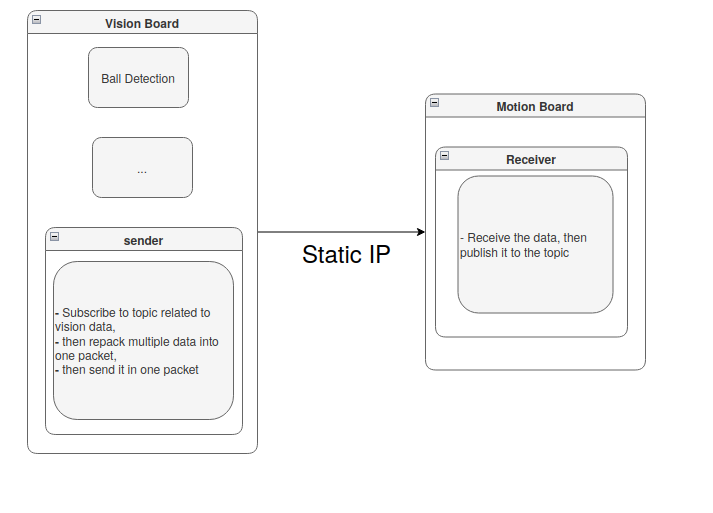
The communication program is located inside altair_comms folder at vision_bridge package (Path from workspace root: src/altair_comms/vision_bridge/ ). It is consisted of sender and receiver program.
- Sender Program#
The sender program is subscribing to topics related to vision data that will be used for fsm or motion program. After subscribing and getting the data, all the data is repacked into 1 big packet structure. The data is not separated into each topic to each packet, but 1 big packet structure for easier serialization.
After repacked for serialization, the data will get send to the motion board. It use static IP address formerly configured. The port value used in vision boarad and motion board must be the same and not blocked by firewall (disable the firewall).
- Receiver Program#
The receiver program will directly receive the data as long as the port is the same because we can set the socket to 0.0.0.0, it means to accept all address. The data will be published in 1 big packet.
NOTE:
The 1 big packetis a specific ros2 msg that contains all necessary data. You can modify it insidealtair_msgsfolder ataltair_msgspackage (Path from workspace root:src/altair_msgs/msg/)
Configuration#
- Sender Program#
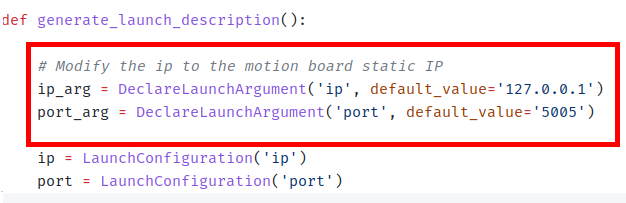
File: vision_board package at src/altair_comms/vision_board/launch/send.launch.py
Change the value inside quotation mark of the default value for ip and port. The IP address is the target static IP of the motion board.
NOTE: The port for both the vision board and motion board must be the same.
- Receiver Program#
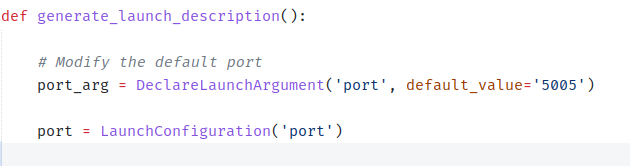
File: vision_board package at src/altair_comms/vision_board/launch/receive.launch.py
Change the value inside the quotation mark of the default value for port. Note that we don’t set any IP in receiver program because the socket can detect communication automatically.
How to Use#
After we configure the launch file, We can start to send the data to the motion board. To use the system, launch any program related to vision in the vision board like usual.
Then launch the sender program:
ros2 launch vision_bridge send.launch.py
Now go to the motion board, then launch the receive program:
ros2 launch vision_bridge receive.launch.py
Customization#
MAKE SURE TO EDIT THE SENDER PROGRAM TO SUBSCRIBE THE RELATED TOPIC THEN REPACT IT TO THE 1 BIG PACKET I.E. ONE SPECIFIC ROS2 MSG